tool report: Subtrace
for when strace doesn't get the job done
subtrace magically intercepts a program's HTTP and
HTTPS traffic, and presents it to you with the familiar Chrome DevTools
interface. We used to use strace
for this, but reading encrypted traffic is hard. Wrapping all your HTTP requests
with logging is tedious, and often several layers deep.
I spoke with Adhityaa, and the
implementation uses bpf and
seccomp_unotify to intercept socket-related system calls. The SSL stuff is
yet more magic, and transparently does man in the middle with an ephemeral cert
that's entirely in-memory in the process. Subtrace is spying on the network
traffic, and can see the SSL handshake, and does some sleight of hand,
unbenknownst to both server and client. None of this requires root, though
it does require the SYS_PTRACE capability.
There's a nifty hosted service, but you can run it entirely locally:
docker run -p 8000:8000 --cap-add=SYS_PTRACE --rm python:bookworm bash -c "
   curl -fsSL https://subtrace.dev/install.sh | sh
   subtrace run -devtools /_ -- python3 << 'EOF'
import http.server
import urllib.request

class Handler(http.server.BaseHTTPRequestHandler):
    def do_GET(self):
        req = urllib.request.Request('https://api.weather.gov/alerts')
        data = urllib.request.urlopen(req).read()
        self.send_response(200)
        self.send_header('Content-Type', 'application/json')
        self.end_headers()
        self.wfile.write(data)

http.server.HTTPServer(('0.0.0.0', 8000), Handler).serve_forever()
EOF
Then, open one tab to http://localhost:8000/_ (where subtrace injected its UI), and then another to http://localhost:8000/. In the former, you'll see both the incoming request and the outgoing request, in all their glory.
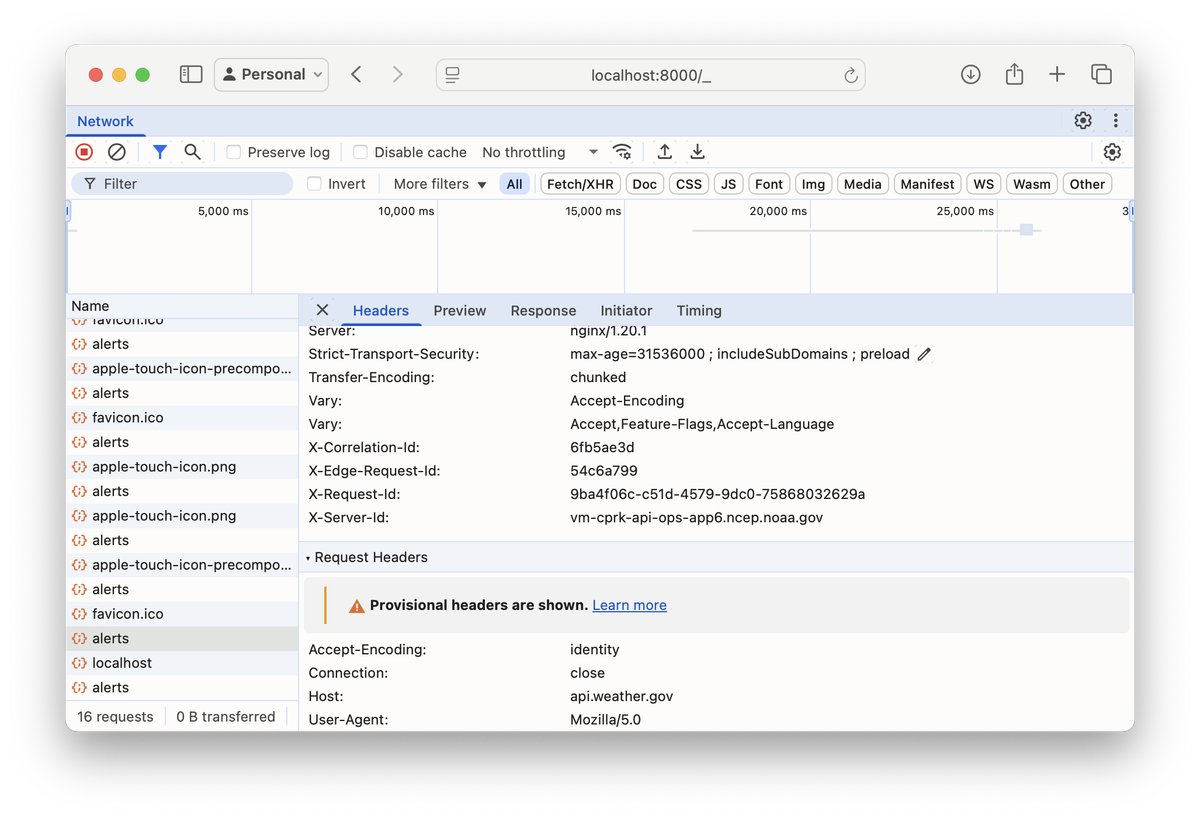
We ran this in Docker because this requires Linux. I'm told a Mac native version is in the works.
Happy debugging!